Did you just receive an ADA demand letter?

See what is wrong, what to fix first, and what changed.

  • Free check*
  • Results in minutes
  • $19 for the full proof report

*No account is needed. We never contact businesses first, and we are not affiliated with any law firm.

Questions before you start? Call (470) 866-1446.

This is a technical accessibility assessment, not legal advice, and automated testing cannot establish ADA compliance.

Example from a sample assessment

Issue #1: Product images

High priority

37 product images have missing or inadequate alternative text. 30 missing, 7 look like file names such as “IMG_4821.jpg”.

Why it matters
Screen-reader users may not be able to understand what the products represent.
How to fix in Shopify
Products → product → Media → image → add descriptive alt text.
Your letter says
“images lack alternative text” (p. 2)
Fixed after re-check37 before · 0 detected now · September 18, 2026

See what’s wrong, fix it, and document what changed

  1. Enter your website address and upload your letter

    Upload the letter as a PDF or photo. If you do not have a letter, you can still check your website.

  2. We scan your site and compare the results

    We test up to 15 key pages, compare the issues we find with the claims in the letter, and post the results within minutes.

  3. Follow the steps to fix each issue

    The full report includes evidence and instructions for Shopify, WordPress, Squarespace, or Wix, starting with the highest-priority issues.

  4. We check your site again

    You can run up to three re-checks within 30 days. Each one creates a dated before-and-after record to share with your attorney.

See a sample report before you start

How we test, in detail

What fixing looks like

See how three common accessibility problems look before and after they are fixed. Your report explains the problems found on your site just as clearly.

Text that's hard to read

Pale gray text on white is hard to read for people with low vision, and for anyone on a phone in bright light.

BeforeProduct description in pale gray text on white, hard to read.
AfterThe same description in dark gray text, easy to read.

Photos with no description

Blind shoppers use a screen reader, which reads out a short description of each photo. Without one, they hear a file name or nothing at all.

Demo store product photo of a lit candle.
Before

A screen reader says: “IMG_4821.jpg”

After

A screen reader says: “Lavender Field candle glowing while lit”

Form boxes with no label

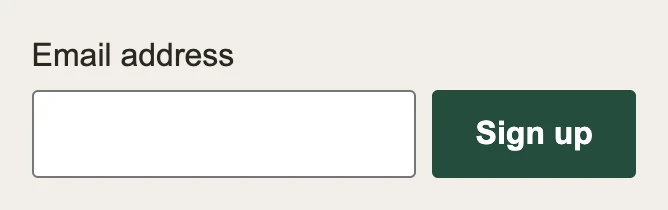
The hint inside the box disappears as soon as you type, and some screen readers skip it. A label above the box fixes both.

BeforeNewsletter form with only gray hint text inside the email box.
AfterThe same form with an Email address label above the box.

See the demo store's full before-and-after report

We check our own website, too

We test this website the same way we test yours. Our latest automated check found no problems, and we run it again whenever we update the website.

Automated checks find only part of accessibility problems. Read our accessibility statement.

What we don't do

No widget or overlay.

We add nothing to your website. You fix the site itself.

No legal advice.

Work with your attorney. We give them the technical facts.

No promises about the outcome.

The best result we report is “0 detected by automated check.”

The regular price is $49. The launch price is $19 until December 31, 2026.

The launch price ends on December 31, 2026. After that, the regular price will increase to $49.

This is a one-time payment. No subscription is required. The price includes three re-checks within 30 days.

*You will receive a full refund if the report does not identify specific accessibility issues that you can fix. Terms apply.

The free check shows how many accessibility issues we found. If you uploaded a letter, it also shows how many claims match those issues. You only pay for the full report, fix instructions, and dated records to share with your lawyer.

The proof report includes

  • Technical Assessment + Fix Plan with your letter's claims, prioritized evidence, platform-specific steps and a manual checklist
  • Up to 3 re-checks in 30 days with each issue's status, before and now
  • Verification report and evidence package with URLs, timestamps, tool version and file checksums
Check your site free

By starting a check you confirm you own the website or are authorized to have it tested.

This is a technical accessibility assessment, not legal advice, and automated testing cannot establish ADA compliance.

What to read next

Free Shopify ADA risk check

Check for common accessibility issues that often appear in demand letters.

ADA website demand letter checklist

Preserve records, collect technical facts, fix the real issues, and document what changed.

Shopify demand letter guide

What Shopify store owners should check first: images, theme settings, apps and keyboard flow.

Is the letter real or a scam?

How to slow down, verify the sender and avoid scare tactics while you gather facts.

What to document after fixes

What belongs in a technical remediation report and dated verification record.

Website accessibility demand letter

A plain-English overview of what these letters usually claim and what to check.

What owners ask first

Is this legal advice?

No. It's a technical assessment of your website. Talk to a lawyer about the letter, any deadlines in it, and how to respond.

Will this make the letter go away?

We can't promise any legal outcome. What we give you is a clear list of what's technically wrong, how to fix it, and dated records of what changed.

Which platforms do you cover?

Fix steps are written for Shopify, WordPress, Squarespace and Wix. Other sites get code-level instructions a developer can follow.

I haven't received a letter. Can I still check my site?

Yes. Without a letter, priorities come from the scan alone.

Can automated testing find everything?

No. Automated checks find only part of accessibility problems. That's why every report includes a manual checklist, such as testing your store with only a keyboard.

How do I reach a person?

Call (470) 866-1446, email support@adatriage.com or use our contact form. A person replies to emails and messages within 24 hours. More about us.